


Getting back into a chat platform should take under a minute, yet login pages have a way of throwing unexpected obstacles. Emerald Chat, run by Connected Software Inc., enforces a strict 18-plus age policy and uses both AI and human moderators around the clock, which means its login process includes a few more checks than a typical site. Knowing exactly what to expect saves you time and frustration.
How to Log In to Emerald Chat Step by Step
The quickest route is the Google sign-in option. Head to emeraldchat.com, click the login button in the top right corner, and select "Continue with Google". Choose the Google account you used when you registered, grant the requested permissions, and you land straight in the lobby. The whole process takes around 30 seconds on a stable connection.
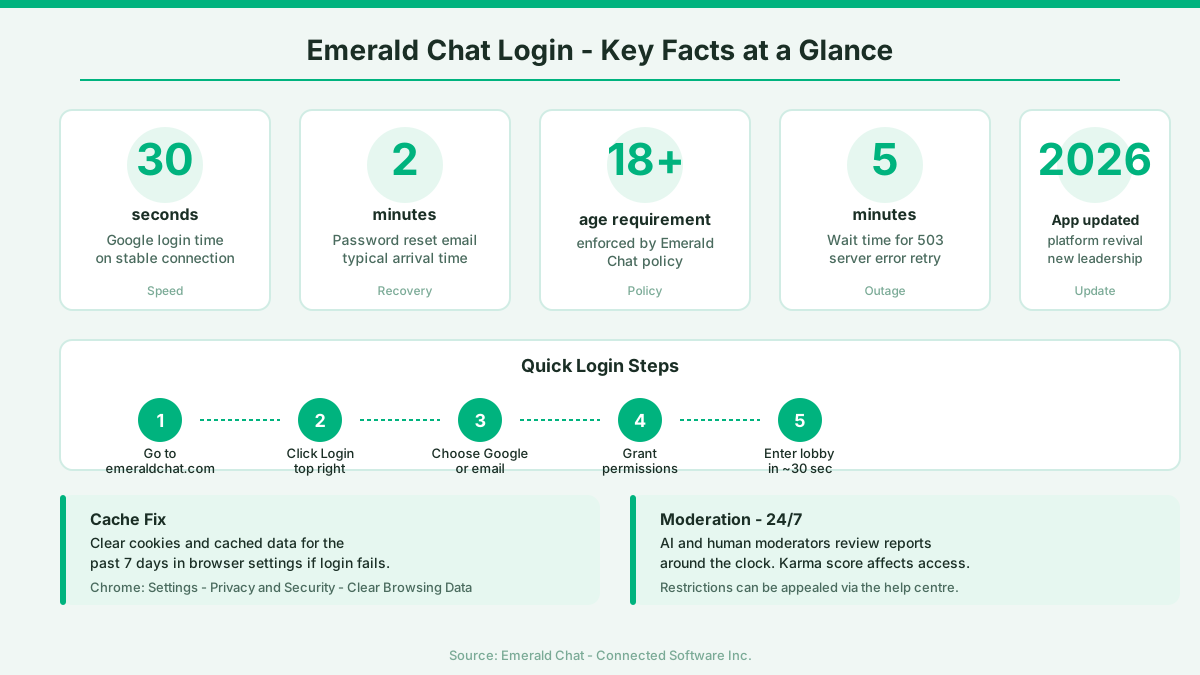
If you signed up with an email address instead, enter your email and password on the same login screen. Passwords are case-sensitive, so check your caps lock key first. If you have forgotten your password, use the reset link on the login page. A reset email usually arrives within two minutes. Check your spam folder if it does not appear in your inbox.
On mobile, the steps mirror the desktop experience. Open the Emerald Chat app for Android or iOS, tap "Sign In", and choose your method. The app was updated as part of the platform revival under new leadership in 2026, bringing improved security to the authentication flow.
Why Emerald Chat Login Is Not Working
The most common culprit is a stale browser cache. Cached cookies from a previous session can conflict with the current login token. Fix it by opening your browser settings, clearing cookies and cached data for the past seven days, then trying again. In Chrome, this is under Settings, Privacy and Security, Clear Browsing Data.
A second frequent cause is Google account permissions. If you revoked Emerald Chat's access inside your Google account settings at some point, the OAuth handshake fails silently. Go to myaccount.google.com, find "Third-party apps with account access", and check whether Emerald Chat is listed. If it is not, the app will ask for permission again on your next login attempt.
Server-side outages do happen. Because the platform matches users in real time, a spike in traffic can briefly bring the login endpoint down. If you see a 503 or gateway error, wait five minutes and try again before assuming your account has been suspended.
What to Do If Your Account Is Restricted
Emerald Chat uses a karma system that tracks how other users rate their experience with you. Negative karma scores, accumulated when multiple users report your behaviour, can lead to filters limiting who you can match with or, in serious cases, a temporary block on your account. The moderation team reviews reports 24/7 and takes action ranging from warnings to permanent bans for violations such as harassment, nudity, or threats.
If you believe your restriction is a mistake, contact the support team through the help centre at emeraldchat.com. Provide your account email and a clear explanation. Restrictions tied to a karma score can sometimes be appealed, though the outcome depends on the review team's findings. Building positive karma going forward - by receiving good ratings from the people you chat with - gradually improves your standing on the platform.
Access may also be restricted at a regional level. Emerald Chat is blocked in certain territories. In the UK it is fully accessible, but users travelling abroad may find the platform unavailable depending on local regulations.
Logging In on iPhone and the Mobile App
Several related searches point to iPhone-specific login questions, and the fix is usually straightforward. If the app crashes on launch, delete it, restart your phone, and reinstall from the App Store. This clears any corrupted local data. Make sure your iOS version is current, as older system versions can block OAuth redirects used by the Google login flow.
If you prefer the mobile browser over the app, Safari sometimes blocks third-party cookies by default. Go to Settings, Safari, and turn off "Prevent Cross-Site Tracking" temporarily while you log in. Once your session is established you can switch it back on.
Keeping Your Account Secure After Login
I started writing about the dating world after a particularly humbling summer of dates in London, and one thing I learned fast was that your digital safety matters as much as your personal safety. The same mindset applies here. Once you are logged in, review the privacy settings inside your Emerald Chat profile. You can stay fully anonymous - the platform supports anonymous usage by design - but it is worth checking what information is visible to your chat partners.
Use the block and mute tools freely. They are there to protect your experience, not to be saved for extreme cases. If someone makes you uncomfortable in the first exchange, blocking them costs you nothing. Respect for your own boundaries starts with using the tools the platform gives you. That confidence in setting limits is what makes random chat genuinely enjoyable rather than stressful.
For account security, avoid reusing the same password across multiple sites. If your Google account is your login method, enabling two-factor authentication on Google itself adds a meaningful layer of protection to your Emerald Chat access by extension.
Comments
No comments yet.
Leave a comment
Your email will not be shown. Comments are reviewed before they appear.